
 ⚡ At a Glance: Booth Display Specs Specs ⚡ At a Glance: Booth Display Specs Specs | |
|---|---|
| Target Platform & OS | Trade Show Rental TVs & LED Walls (Samsung, LG, Sony, Sharp, Hisense) |
| Protocol & Port | DLNA 1.5 / UPnP MediaServer, Port 8080 (Local Direct Play) |
| Connection Type | Phone Personal Hotspot (0 MB Cellular Data, Zero Venue Wi-Fi Fees) |
| Transcoding | None (Direct Play original 4K master bitstream to TV hardware decoder) |
| Typical Setup Time | < 90 seconds (Turn on Hotspot, connect booth TV, tap 'Turn on sharing') |
The $1,500 Trade Show Tax: Why Convention Center Wi-Fi Is an Exhibitor Nightmare
Exhibiting at major commercial trade shows - whether CES, NAB Show, SEMA, HIMSS, NRF, or Mobile World Congress - is a massive investment. Between booth space fees, exhibit fabrication, travel expenses, and promotional collateral, companies regularly spend $20,000 to over $150,000 per event.
Yet, when exhibitors finalize their on-site utility order forms, they encounter an infuriating line item: Dedicated Booth Wi-Fi Internet. Major convention centers contract with monopoly telecom providers who charge astronomical rates:
- $1,200 to $1,800: Standard 1.5 Mbps to 5 Mbps single-device wireless connection for a 3-day show.
- $2,500 to $4,000+: Dedicated Ethernet drop or multi-device wireless network.
- Strict Anti-Hotspot RF Policing: Many venues employ aggressive RF monitoring to detect rogue access points, threatening exhibitors who attempt to set up independent broadband routers.
Exhibitors who decline these exorbitant fees and attempt to stream product demos over cellular 5G networks quickly hit a wall. When 40,000 badge-holders flood the hall, cellular carrier towers suffer severe RF gridlock. Cloud-based video streams (YouTube, Vimeo, or web-based signage players) buffer endlessly, freeze on black screens, and destroy the booth's professional image.
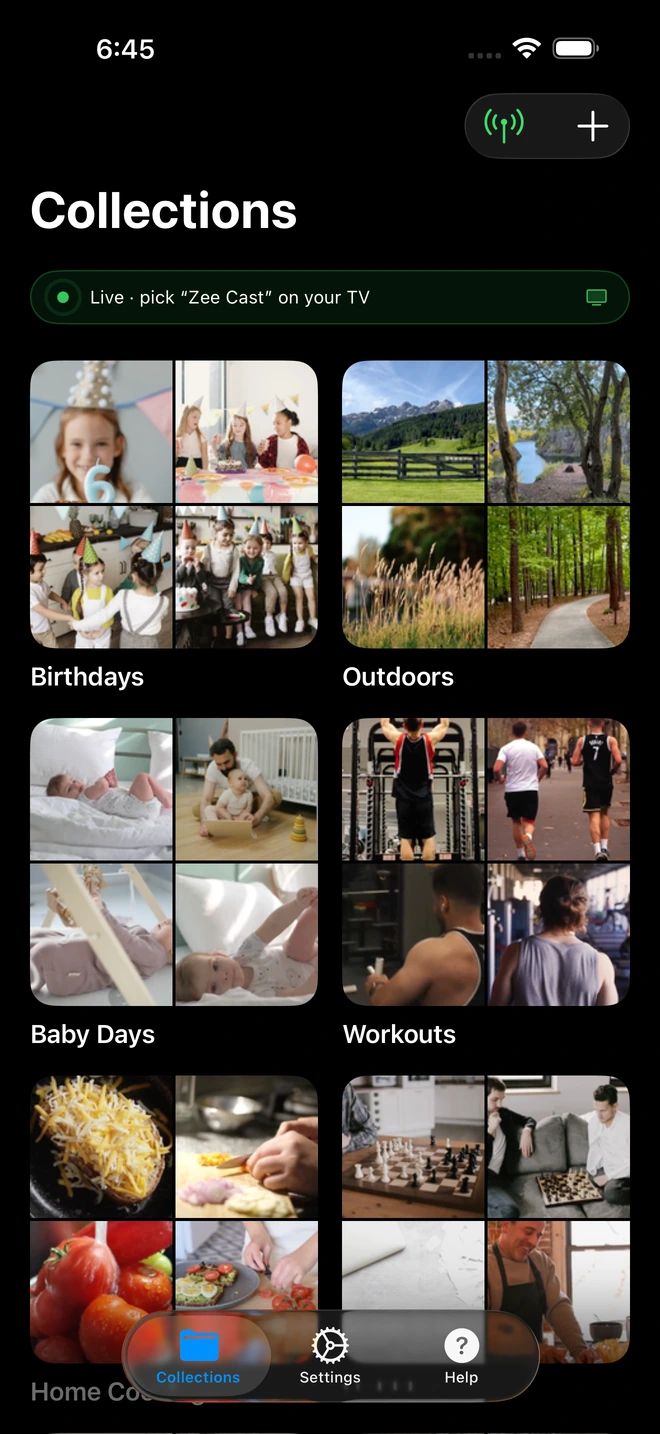
- 1Sharing is Live: TV detects Zee Cast under Connected Devices.
- 2Direct Play streams full-resolution photos & videos without mirroring.
The Zero-Dollar Alternative: Local Layer 2 Hotspot Direct Play
What many trade show managers don't realize is that you do not need the internet to display 4K video on a smart television. You only need a local network connection between the device holding the video file (your smartphone) and the display decoding the pixels (the booth TV).
By utilizing Zee Cast combined with your smartphone's native Personal Hotspot feature, you create an isolated, ultra-high-speed local Wi-Fi bubble directly inside your booth:
- Your phone broadcasts a standard 5 GHz 802.11ac/ax local Wi-Fi network.
- The booth rental smart TV connects to your phone's hotspot.
- Zee Cast activates an embedded UPnP MediaServer daemon on your phone.
- The television discovers Zee Cast via SSDP multicast and streams the 4K demo reel directly from your phone's storage via local HTTP byte-range requests.
Crucial Economic Fact: Because all video traffic travels exclusively across the local wireless link between your phone and the television, 0 MB of cellular data is used, and zero dollars are spent on convention center internet fees. Even if your cellular provider has zero reception in a concrete basement exhibit hall, the local hotspot streaming continues uninterrupted.
Exhibition Booth Video Display Comparison
| Method | Total Cost | Internet Dependency | Hardware Friction | Crowd Congestion Risk |
|---|---|---|---|---|
| Venue Dedicated Wi-Fi | $1,200 – $3,500 | 100% cloud dependent | Requires IT router setup | Slowdowns during peak attendee traffic |
| Cellular 5G Hotspot (Cloud) | $50 – $100 data plan | 100% cellular dependent | Drains phone data caps | Severe (Cell towers fail in crowded halls) |
| USB Flash Drive | $20 | None | Blocked ports, crashes, no loop | None (but high player failure rate) |
| Zee Cast Local Direct Play | $0 (or one-time Pro) | Zero broadband needed (0 MB data) | Zero cables, zero dongles | Zero (100% local hardware playback) |
Step-by-Step Exhibition Setup: Flawless 4K Looping All Day
1. Prepare Your Media Master Files Before the Show
Never download video files on the trade show floor. Export your high-definition product demonstration reels, customer testimonials, and logo animations to your phone's camera roll or local files ahead of time. Use standard MP4 (H.264 or HEVC) with an average bitrate of 25–40 Mbps for razor-sharp 4K clarity.
2. Power Up the Booth TV and Enable Phone Hotspot
Turn on your smartphone's Personal Hotspot in Settings. Pick up the booth TV remote control, navigate to Network > Wireless Settings, select your phone's hotspot name, and enter your password. The television establishes an immediate local connection.
3. Launch Zee Cast and Curate Your Booth Album
Open Zee Cast, tap the + button, and create a collection named "Trade Show Demo Reel". Select your master video files. Tap Turn on sharing.
4. Initiate Continuous Playback on the TV Remote
On the television remote, select Zee Cast from the input/sources menu (Samsung Connected Devices, LG Photo & Video, Sony Media Player, Roku Media Player). Open your demo reel and press Play.
Open the television's on-screen playback options (press Options, Tools, or the gear icon on the remote) and set Repeat Mode to Repeat All. The television will now loop your product reel continuously from morning until evening.
5. Managing Battery Life for an 8-Hour Expo Day
Because Zee Cast serves static data packets without running heavy GPU video rendering on your phone, power draw is remarkably gentle. However, during an intense trade show day where booth staff are constantly on their feet, keep your phone connected to a standard 10,000 mAh portable USB power bank tucked discreetly under your booth counter. Your 4K demonstration will run flawlessly for 10+ hours without interruption.
Overcoming Venue RF Scanning and Enforcement
Some hyper-aggressive convention venues employ network scanning tools to detect unauthorized Wi-Fi routers broadcasting commercial SSIDs. When using your phone's Personal Hotspot with Zee Cast:
- Set your hotspot network name to a discreet personal name (e.g., "iPhone 15") rather than your company or booth name.
- Use standard WPA3/WPA2 password protection.
- Because your hotspot communicates exclusively with your single booth television on low power over a distance of just a few feet, it generates minimal RF interference and remains indistinguishable from normal attendee personal phones.
Frequently Asked Questions
Why do convention centers charge $1,000 to $3,500 for dedicated booth Wi-Fi?
Major convention venues (such as the Las Vegas Convention Center, McCormick Place in Chicago, the Javits Center in New York, and ExCeL London) grant exclusive telecommunications concessions to single AV contractors (like Smart City Networks or Freeman). These exclusive contractors operate near-monopoly pricing models, charging exhibitors anywhere from $1,200 to $3,500+ for a single basic Wi-Fi drop per 10x10 booth space, turning basic connectivity into an enormous budget drain.
Why can't exhibitors simply stream product videos from YouTube or Vimeo over 5G cellular?
When 30,000 to 80,000 attendees, exhibitors, and media pack into a single concrete-and-steel exhibition hall, local cellular carrier towers suffer severe RF saturation. Downlink speeds collapse from 300 Mbps down to barely 0.5 Mbps, and latency spikes past 2,000ms. Attempting to stream 4K or 1080p video from YouTube, Vimeo, or Google Drive results in constant buffering pauses, dropped frame rates, and humiliating black screens in front of booth visitors.
Does running a booth TV video loop over my Personal Hotspot use my phone's cellular data?
No. Zee Cast streams media strictly over the local Layer 2 Wi-Fi link created between your smartphone and the booth TV. Because the video file is stored directly in your phone's local flash storage and delivered across the local wireless interface using HTTP byte-range requests (port 8080), exactly 0 MB of cellular data is consumed. Even if your phone is in Airplane Mode with Wi-Fi enabled, local hotspot streaming functions perfectly.
Why does Zee Cast beat using a USB thumb drive in a trade show rental TV?
Rental TVs at expos present numerous hardware headaches: (1) TVs are mounted flush against booth backdrops or modular truss walls, making rear USB ports completely unreachable without dismantling the display; (2) Rental TV firmware often formats USB drives into read-only states, rejects drives formatted in exFAT, or rejects video files over 4GB; (3) Built-in TV USB players frequently crash after a few hours or lack a dependable continuous repeat mode; and (4) If your marketing team renders an updated demo video overnight, updating a USB drive requires a laptop and re-mounting headaches, whereas Zee Cast updates wirelessly in seconds.
How long can my phone stream a continuous 4K video loop on battery power?
Because Zee Cast does not perform any video transcoding or GPU screen rendering - it simply acts as an ultra-efficient HTTP file server delivering static byte ranges to the TV's hardware decoder - it consumes very little power. A typical smartphone running Zee Cast can stream for 6 to 9 hours on battery alone. However, for a multi-day trade show, we recommend keeping your phone plugged into a standard wall outlet or a 10,000 mAh power bank beneath your booth desk.
What happens if attendees walking by attempt to cast to our booth television?
Because your booth television is connected directly to your phone's private Personal Hotspot and not an open venue network, passerby devices cannot even discover the TV. Furthermore, by upgrading to Zee Cast Pro and enabling the 'Device Approval' firewall, any unrecognized IP address attempting to access the media server is blocked instantly until you approve it on your phone.
Can we stream to multiple booth displays simultaneously from one phone?
Yes. Zee Cast's multi-threaded HTTP server can concurrently deliver independent or synchronized video streams to multiple smart TVs located across a larger booth space (e.g., an overhead header display, a product demo pedestal screen, and a meeting lounge monitor), provided all TVs are connected to the same hotspot network.
What video container and codec should we export for exhibition booth screens?
Export your product showcase video as an MP4 container with H.264 (AVC) or H.265 (HEVC) video encoding and stereo AAC audio. Target a bitrate between 20 Mbps and 40 Mbps for 4K resolution, or 10 Mbps to 15 Mbps for 1080p resolution. This ensures universal hardware decoding across all TV rental brands (Samsung, LG, Sony, TCL, Hisense) with silky-smooth frame rates.
Does Zee Cast require any ongoing subscription or cloud account to use at expos?
No. Zee Cast requires zero cloud accounts, zero logins, and zero remote server pings. The app functions completely offline, making it completely immune to venue internet outages, firewall restrictions, or remote authentication failures during critical show hours.


