
The short version
- We run the shipping build of Zee Cast (currently 2.10.4) on both a current iPhone and a current Android phone.
- We start sharing with each phone, then discover and play a collection from every renderer in the matrix below.
- We test on a normal home Wi-Fi network and repeat the critical paths over a Personal Hotspot with no internet.
- We record the app version and date at the top of the affected guide, and correct the article if a TV's behaviour changes.
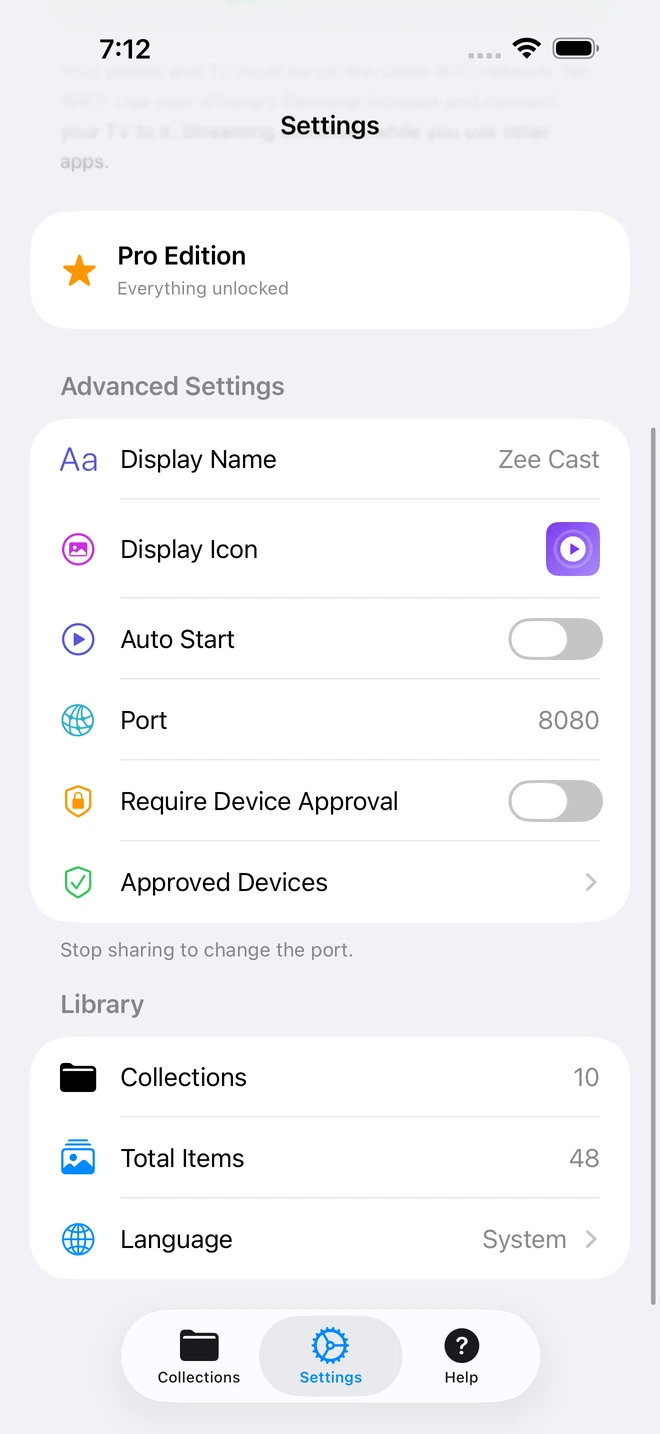
- 1Port 8080 is the HTTP server port we verify the TV connects to.
- 2Device Approval is switched on to test the allow/deny gate during a browse request.
Phones we run the server on
| Device | Platform | Why it is in the matrix |
|---|---|---|
| iPhone 16 Pro | iOS 26 | Current iOS reference; HEIC→JPEG, Dolby Vision Profile 8.4 capture, hotspot mode |
| Samsung Galaxy S24 | Android 15 | Current Android reference; HEVC/HDR10+ capture, foreground-service backgrounding |
| iPhone SE (2nd gen) | iOS 18 | Older-device regression check for the background runtime |
| Pixel 6a | Android 14 | Non-Samsung Android discovery and codec check |
Renderers we play back on
| Device family | Tested version | Player used |
|---|---|---|
| Samsung Smart TV | Tizen (2018–2025 models) | Native Smart Hub media player |
| LG Smart TV | webOS 4.0–24 | Native Photo & Video / SmartShare |
| Roku | Roku OS 11+ | Roku Media Player channel |
| Amazon Fire TV | Fire OS 7+ | VLC for Fire TV / Nova Video Player |
| Android TV / Google TV | Android 9+ | VLC, Kodi, native Files |
| Apple TV | tvOS 16+ | Infuse |
| PlayStation 5 / PS4 | System software 22+ | Media Player |
| Xbox Series X|S / One | System software 22+ | Media Player |
| Desktop | Windows / macOS / Linux | VLC, Kodi |
Networks we test on
| Setup | What it is for |
|---|---|
| Home Wi-Fi — 5 GHz band | Primary reference: one router, phone and renderer on the same SSID |
| Home Wi-Fi — 2.4 GHz band | Regression check for 4K stutter and discovery |
| Wi-Fi 6 / 6E router | Throughput headroom tests for high-bitrate 4K 60fps |
| iPhone Personal Hotspot | No-router and travel scenarios — TV joins the phone's hotspot |
| Wired Ethernet TV | Baseline where the renderer supports it |
How a guide gets verified
- 1
Reproduce on real hardware
We follow the guide's own steps on the devices above — no emulator-only claims.
- 2
Confirm the original bitstream
We check that playback is Direct Play — the TV reports the original resolution, frame rate and HDR metadata — not a re-encode.
- 3
Check background behaviour
We lock the phone, switch apps and take a call mid-playback to confirm the stream is unaffected.
- 4
Cite primary sources
Protocol, codec and OS claims link to the primary spec (IETF, OCF, vendor developer docs), not to another blog.
What we cannot test — and say so
Honest limits
- SSDP multicast does not work in the iOS Simulator or most Android emulators. Discovery claims are verified on physical hardware only.
- No HEVC → H.264 transcoding. iOS converts HEIC photos to JPEG; Android serves originals. We do not claim otherwise.
- No UPnP event subscriptions (SUBSCRIBE/NOTIFY) and no CDS Search.
- The HTTP port must be free at startup. There is no automatic fallback port.
Update cadence
Guides are re-verified when a TV platform ships a behaviour change, when Zee Cast ships a feature that a guide references, or when a reader reports a factual error. Each article shows aLast reviewed date in its byline and author box; material corrections are listed in that article's changelog.
Tell us we are wrong
If a step does not work on your TV, tell us the model, firmware, and what you saw. Emailsupport@eslamx.com and we will try to reproduce it and update the guide.