

Key takeaways
- Plex, Emby, and Jellyfin are dedicated 24/7 desktop/NAS servers built for multi-terabyte movie and TV show libraries.
- Dedicated servers consume 40–120W of continuous electricity ($50–$150/year) and require constant maintenance and storage management.
- Zee Cast turns your phone into an on-demand UPnP/DLNA media server in 1 tap, consuming 0 watts when idle and requiring zero hardware setup.
- For personal photos, vacation videos, and camera roll sharing, mobile DLNA completely eliminates the friction of desktop syncing and cloud logins.
The Dilemma: Dedicated Server Hardware vs. On-Demand Mobile DLNA
Over the past decade, home media enthusiasts built elaborate home lab environments. Dedicated Network Attached Storage (NAS) appliances, unRAID towers, and refurbished mini-PCs running Plex Media Server, Emby, or Jellyfin became standard fixtures in tech-savvy households.
These desktop server platforms are undeniably powerful for indexing thousands of movies, downloading subtitle tracks, and streaming across the globe. However, when your only goal is to show family photos from your weekend trip or watch a crisp 4K 60fps video recorded on your phone on the living room TV, dedicated desktop servers present enormous friction:
- You must first sync your phone's media to the desktop server using external upload tools.
- Your desktop PC or NAS must stay awake 24/7/365, wasting electricity and generating heat.
- Software updates, database corruption, sleep-mode sleep states, and cloud authentication outages routinely break connectivity right when family sits down to watch.
Zee Cast solves this by inverting the paradigm: why maintain a 200W desktop server when the supercomputer in your pocket already holds all your photos and 4K videos?
Head-to-Head Comparison: Plex vs. Emby vs. Jellyfin vs. Zee Cast
Examine the architectural requirements, maintenance overhead, and costs across all four media server solutions:
| Evaluation Criteria | Zee Cast | Plex Media Server | Emby Server | Jellyfin (Open Source) |
|---|---|---|---|---|
| Host Hardware | Existing Smartphone (iPhone or Android) | Dedicated PC / NAS (Intel QuickSync / GPU) | Dedicated PC / NAS (Windows, Linux, Docker) | Dedicated PC / NAS (Linux, Docker, TrueNAS) |
| 24/7 Power Consumption | 0 Watts Idle (<2% phone battery/hr) | 40–120 Watts ($45–$150/year in power) | 40–120 Watts ($45–$150/year in power) | 40–120 Watts ($45–$150/year in power) |
| Setup Time & Complexity | 15 Seconds (Install → Pick → Share) | 30–60 Minutes (Accounts, agents, paths) | 30–60 Minutes (Libraries, port config) | 45–90 Minutes (Docker, permissions, GPU) |
| Camera Roll Integration | Native & Instant (Direct camera roll access) | Manual / Complex (Requires separate sync app) | Manual / Complex (Third-party upload sync) | Manual / Complex (Requires Nextcloud/Immich) |
| Transcoding CPU Load | 0% (Pure Direct Play) (TV hardware decodes raw file) | High CPU/GPU Load (Transcodes if codec mismatches) | High CPU/GPU Load (Hardware transcode paywalled) | High CPU/GPU Load (FFmpeg hardware transcode) |
| Cloud Reliance & Outages | 100% Local / Zero Cloud (Works completely offline) | Cloud Auth Dependent (Outages at plex.tv block local) | Hybrid Cloud / Local (Emby Connect or local IP) | 100% Local (Self-hosted authentication) |
| Licensing & Cost | Free + One-Time Pro (No recurring subscriptions) | Freemium / Sub ($4.99/mo or $120 lifetime) | Freemium / Sub ($4.99/mo or $119 lifetime) | 100% Free (GPL open-source software) |
| Travel & Hotspot Portability | 100% Portable (Streams anywhere via Hotspot) | Zero Portability (Tethered to home network) | Zero Portability (Tethered to home network) | Zero Portability (Tethered to home network) |
Deep Dive: Architecture & Use Case Analysis
1. When Desktop Servers Make Sense (Plex, Emby, Jellyfin)
Dedicated server software is unbeatable for large-scale digital archival. If you maintain a library of 500 Blu-ray rips, complete seasons of television shows, and need metadata scraping (movie posters, actor bios, IMDb ratings), Plex, Emby, or Jellyfin are essential. They excel at:
- Remote Multi-User Streaming: Allowing family members across the globe to stream movies simultaneously over the internet.
- Automated Subtitle Fetching: Integrating with OpenSubtitles to download synchronized SRT files automatically.
- Format Standardization: Converting unsupported audio codecs (like DTS-HD MA) into AAC for basic smart TV soundbars.
2. When Mobile DLNA Wins Hands-Down (Zee Cast)
For the vast majority of personal media - smartphone camera rolls, vacation clips, 4K 60fps family videos, and high-resolution photo slideshows - a desktop media server is cumbersome overkill.
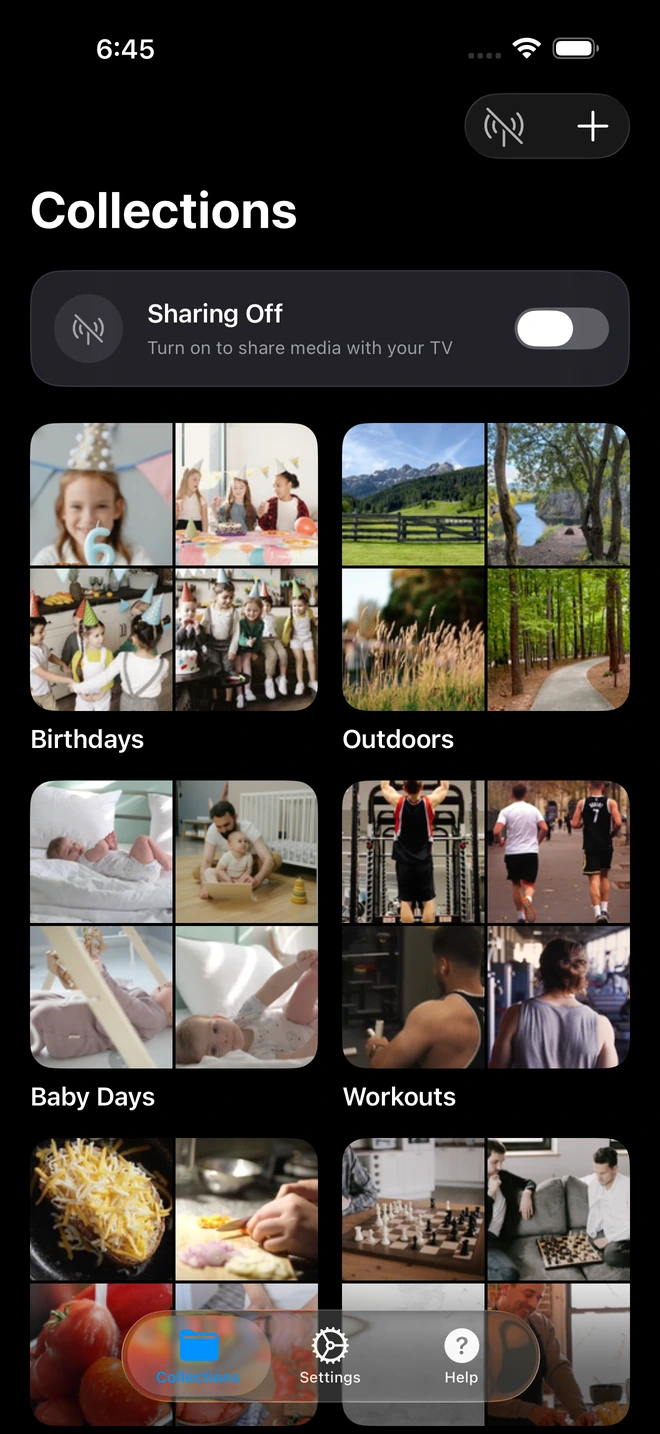
- 1Curated collections isolate shared media from your camera roll.
- Zero Maintenance & Crashes: You never have to log into a Linux terminal, restart crashed Docker containers, or update FFmpeg drivers before showing photos.
- Zero Electric Overhead: You avoid running a power-hungry desktop PC 24 hours a day just in case someone wants to view photos on the weekend.
- Complete Privacy: With Plex, personal photos uploaded to a shared server are often visible to all managed server users. Zee Cast lets you hand-pick only the photos for this specific occasion using Curated Collections, backed by per-IP Device Approval.
- Ultimate Portability: When visiting grandparents or staying in a hotel without reliable internet, desktop servers become inaccessible. With Zee Cast, you simply turn on your phone's Personal Hotspot, connect the TV, and stream immediately.
Recommendation Matrix
| Your Core Need | Best Solution | Key Reason |
|---|---|---|
| Quickly show phone photos & 4K videos on TV | Zee Cast | Instant 1-tap setup, 0% CPU transcode, zero account friction. |
| Stream 10+ TB of ripped movies across the globe | Plex or Jellyfin | Dedicated multi-drive storage arrays and remote internet transcoding. |
| 100% Free & Open-Source home movie server | Jellyfin | No licensing fees, no cloud telemetry, completely self-hosted. |
| Traveling / Vacation / Off-grid photo sharing | Zee Cast | Runs offline on Personal Hotspot with zero internet requirements. |
Frequently Asked Questions
When should I use Zee Cast instead of Plex, Emby, or Jellyfin?
Zee Cast is ideal when you want to stream personal photos, family albums, and 4K camera roll videos directly from your phone to your smart TV without setting up, maintaining, or paying electricity bills for a 24/7 desktop PC or NAS. Plex, Emby, and Jellyfin are designed for organizing massive multi-terabyte libraries of ripped movies and TV series across dedicated storage arrays.
How much electricity does a 24/7 desktop or NAS media server consume compared to Zee Cast?
A dedicated desktop PC or multi-bay NAS server running 24/7 draws between 40W and 120W of power, adding $45 to $150 per year to your home electricity bill. In contrast, Zee Cast runs on-demand strictly when you want to stream. It consumes less than 2% of your phone's battery per hour of streaming and zero watts when idle.
Do I need to copy or sync my phone's camera roll to a computer to use Zee Cast?
No. With Plex, Emby, or Jellyfin, you must configure automated background photo sync tools (like Nextcloud, Plex Camera Upload, or Synology Photos) to duplicate gigabytes of phone media onto desktop hard drives before they can be indexed. Zee Cast serves your photos and 4K videos directly from your iPhone or Android camera roll in real-time.
Does Zee Cast require creating a user account or logging into cloud servers?
No. Zee Cast requires zero user accounts, zero email logins, and zero cloud authentication. Unlike Plex - which routes authentication through plex.tv and fails to connect locally during cloud outages unless advanced bypasses are configured - Zee Cast operates 100% locally on your home Wi-Fi network.
How does video transcoding differ between Plex/Jellyfin and Zee Cast?
Plex and Jellyfin frequently transcode video files on-the-fly using heavy CPU or GPU cycles when streaming to clients with incompatible formats. Zee Cast uses pure Direct Play: your phone serves the untouched original HEVC/H.264 bitstream via standard HTTP Range requests, allowing your smart TV's dedicated image processor to handle hardware decoding at 0% phone CPU load.
Can I stream outside my home network using Zee Cast?
Zee Cast is intentionally engineered for local, private, zero-latency streaming on your home Wi-Fi or mobile Personal Hotspot. Plex, Emby, and Jellyfin support remote internet streaming outside the home, but this requires port forwarding, dynamic DNS, SSL certificates, or cloud relay services that introduce security attack surfaces.
Which option provides the best privacy for family photo slideshows?
Zee Cast provides superior privacy for personal media. You curate specific collections (e.g., 'Summer Holiday 2026'), and only those files are visible to the TV. Unselected personal photos and screenshots stay completely invisible. Furthermore, Zee Cast offers per-IP Device Approval to block unauthorized devices on your Wi-Fi network.
Is Jellyfin completely free compared to Plex and Emby?
Yes, Jellyfin is 100% free and open-source under the GPL license, including hardware transcoding. Plex gates hardware transcoding and mobile sync behind Plex Pass ($4.99/mo, $39.99/yr, or $119.99 lifetime), and Emby locks similar features behind Emby Premiere. Zee Cast offers a completely free tier with zero ads, and an affordable one-time Pro upgrade with no subscriptions.
Can I use Zee Cast while traveling or in a hotel room?
Yes! Zee Cast travels with you in your pocket. You can turn on your phone's Personal Hotspot, connect your streaming stick or hotel TV, and stream your photos and videos completely offline with zero internet access. A desktop Plex or Jellyfin server cannot travel with you without an active internet connection back home.


