
Key takeaways
- AirScreen forces 30-second video advertisements, banner overlays, and expensive subscriptions on TV users.
- Zee Cast is 100% ad-free across all tiers with zero tracking telemetry and no recurring monthly paywalls.
- Zee Cast uses native UPnP/DLNA architecture: your phone serves raw media directly to Fire TV's native players (like VLC) with 0% transcoding overhead.
- Screen mirroring with AirScreen exposes your entire screen and private notifications; Zee Cast shares only explicitly curated media collections.
The Frustration with AirScreen on Fire TV and Android TV
If you own an Amazon Fire TV Stick, Chromecast with Google TV, or an Android TV box, you have almost certainly encountered AirScreen. For years, AirScreen was the default recommendation for users wanting to cast media from an iPhone, iPad, or Android phone to a streaming stick that lacked native Apple AirPlay or Google Cast support.
However, recent updates have transformed AirScreen into an increasingly hostile user experience:
- Intrusive, Loud Advertisements: Users are regularly subjected to full-screen 30-second video advertisements that blare through home theater speakers before a single photo or video can be displayed.
- Persistent Subscription Paywalls: AirScreen aggressively prompts users to upgrade to premium subscriptions costing $2.99/month or $19.99/year just to eliminate basic streaming restrictions and ad nag screens.
- Severe Performance Bottlenecks: Because AirScreen runs on low-power TV stick processors attempting to emulate proprietary AirPlay and Miracast decryptors, high-bitrate 4K family videos frequently stutter, desync audio, or crash completely.
- Notification Leakage & Battery Exhaustion: Screen mirroring forces your phone's display to remain powered on, broadcasting incoming WhatsApp messages, SMS notifications, and confidential emails directly onto the living room TV.
Zee Cast offers the antidote: a clean, lightning-fast, 100% ad-free mobile media server built for pure local playback. Instead of relying on a clunky, ad-riddled receiver app, Zee Cast leverages universal, industry-standard UPnP/DLNA protocol streaming.
Side-by-Side Comparison: Zee Cast vs. AirScreen
The architectural, privacy, and economic differences between Zee Cast and AirScreen:
| Feature / Capability | Zee Cast | AirScreen |
|---|---|---|
| Advertising Model | ✅ 100% Ad-Free (Zero video ads, zero banners, forever) | ❌ Heavy 30s video interstitials, banner ads, and upgrade banners |
| Pricing Structure | ✅ Free Tier + One-Time Pro Lifetime (No subscriptions) | ⚠️ Subscription model ($2.99/mo or $19.99/yr) or recurring paywall |
| Streaming Architecture | ✅ Native DLNA Media Server (DMS) with HTTP range streaming | ⚠️ Software emulation of AirPlay/Cast/Miracast receiver on TV hardware |
| Video Quality & Bitrate | ✅ Bit-perfect 4K 60fps HDR (Full camera sensor bitrate up to 120 Mbps) | ⚠️ Downscaled to 1080p SDR with aggressive 12 Mbps lossy compression |
| Phone Multitasking & Screen Lock | ✅ Stream with screen locked (Runs quietly in background) | ❌ Screen must remain powered on; locks kill playback |
| Privacy & Notification Safety | ✅ Curated collections only; notifications never appear on TV | ❌ Screen mirror shows all notifications, personal texts, and camera rolls |
| TV App Requirement | ✅ Zero proprietary TV apps (Use free VLC, Nova, or built-in players) | ⚠️ Requires maintaining proprietary AirScreen app on TV storage |
| Access Control & Security | ✅ Per-IP Device Approval modal on phone screen | ❌ Open network receiver, anyone on local Wi-Fi can interrupt |
| Offline & Hotspot Capability | ✅ 100% Offline (Works on Personal Hotspot without home internet) | ⚠️ Frequently fails offline due to ad server checks and license pinging |
Why Direct UPnP/DLNA Beats Emulated Screen Mirroring
1. Direct Bit-Perfect Playback vs. Heavy Transcoding
When AirScreen receives an AirPlay or Miracast stream, your phone's processor has to compress the video in real-time, broadcast it over lossy Wi-Fi packets, and the TV stick's weak processor must unpack and decode the stream. This double-hop encoding introduces latency, color banding, and dropped frames.
With Zee Cast, your phone acts as a high-performance local HTTP server. When you select a video using VLC on your Fire TV or Android TV, the TV issues standard HTTP byte-range requests directly to your phone. The original file stream transfers untouched, allowing the Fire TV's hardware video decoder to render full 4K 60fps HDR with zero degradation.
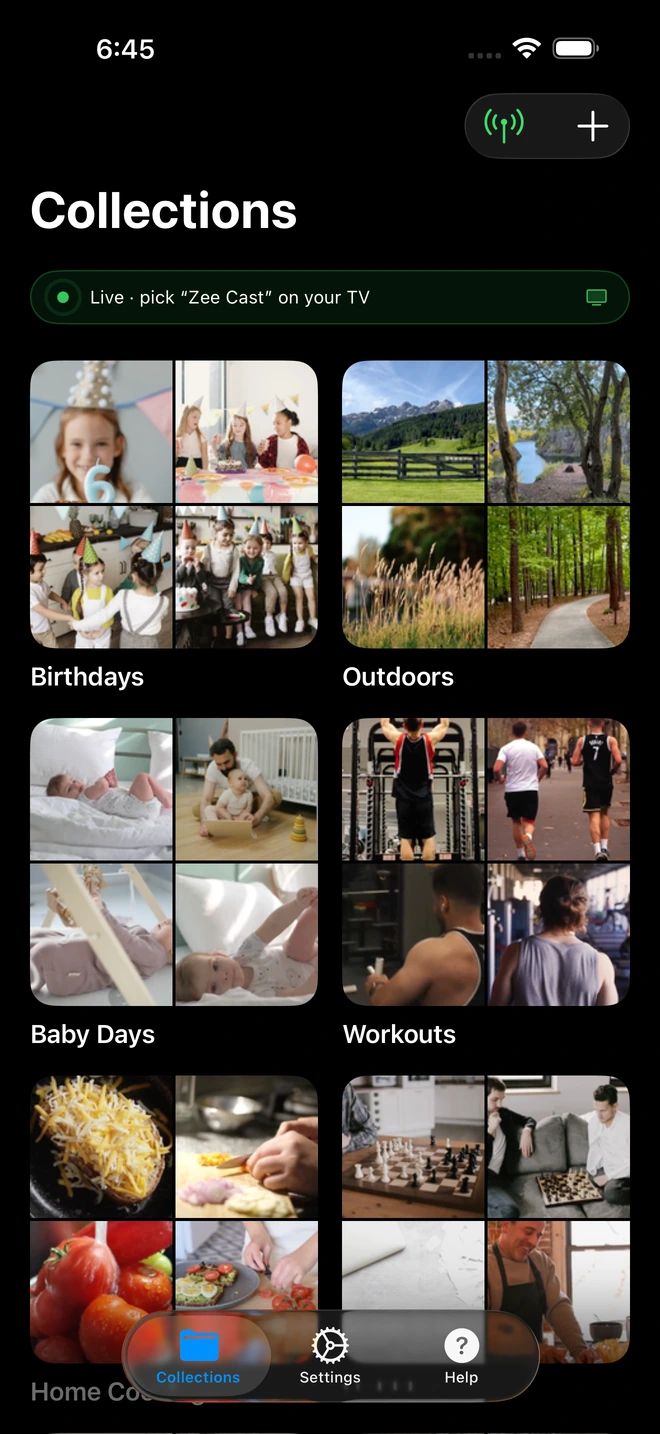
- 1Server is live - instantly discoverable on TV.
2. Serene, Family-Safe Privacy
One of the greatest dangers of using AirScreen for living room entertainment is accidental disclosure. If you mirror your phone's display, every incoming notification - a private banking alert, an intimate instant message, or a calendar reminder - is magnified for everyone in the room to read.
Zee Cast completely decouples media playback from your phone's interface. You create dedicated photo or video collections (such as "Family Vacation 2026" or "Birthday Highlights"). Only those selected files are published to the network. You can reply to sensitive work emails, browse social media, or lock your phone entirely while the TV plays uninterrupted.
3. Lightweight TV Footprint
Amazon Fire TV Sticks and Chromecast dongles have notoriously constrained internal flash storage (often only 8 GB total, with barely 2 GB free). AirScreen takes up substantial storage space and frequently builds up large cache directories. With Zee Cast, you don't need any specialized receiver app. You can use VLC for Fire TV (a completely free, open-source media player with zero ads) to browse and play your collections effortlessly.
How to Replace AirScreen with Zee Cast on Fire TV & Android TV
- 1
Install Zee Cast on Your Phone
Download Zee Cast for free on your iPhone or Android device. No account registration, email login, or payment details required.
- 2
Create Your Media Collection
Select the original 4K videos or photo albums you want to watch on your television. Unselected items remain private on your device.
- 3
Turn On Sharing
Tap Turn on sharing in Zee Cast. Your phone instantly advertises its UPnP/DLNA service across the local Wi-Fi network.
- 4
Open VLC or Media Player on Fire TV
On your Fire TV or Android TV, launch VLC (or Nova Video Player). Navigate to Browsing > Local Network. Select Zee Cast, choose your collection, and enjoy pure, ad-free streaming.
💡 Pro Tip for Fire TV Stick Users
If your Fire TV Stick is connected to a 5 GHz Wi-Fi channel, Zee Cast can stream high-bitrate 4K 60fps family clips exceeding 100 Mbps with instant scrubbing and zero buffer latency. Ensure your router does not have "Client Isolation" or "AP Isolation" enabled.
Frequently Asked Questions
Why do users look for an alternative to AirScreen on Fire TV and Android TV?
AirScreen has become notoriously frustrating for users due to frequent 30-second unskippable video ads, persistent banner overlays, and aggressive prompts pushing annual subscriptions ($19.99/year or $2.99/month). Furthermore, because AirScreen acts as an emulated AirPlay and Cast receiver, it suffers from severe frame drops, audio-video desync, high phone battery consumption, and unexpected disconnections mid-stream.
How does Zee Cast differ fundamentally from AirScreen in streaming architecture?
AirScreen runs as a 'receiver app' installed on your TV that tries to emulate Apple AirPlay, Google Cast, and Miracast protocols simultaneously. This emulation layer is resource-heavy and causes frame drops. Zee Cast takes the opposite approach: it turns your phone into an ultra-lightweight, native UPnP/DLNA Digital Media Server (DMS). Your Fire TV or Android TV's native media player (or free, open-source apps like VLC) pulls the raw media file directly over your local Wi-Fi with bit-perfect hardware decoding and zero emulation lag.
Does Zee Cast display ads or require a monthly subscription?
No. Zee Cast is 100% ad-free on every tier. There are zero banner ads, zero popup interstitials, and zero video ads before or during playback. Advanced features are unlocked through a transparent, affordable one-time purchase (Zee Cast Pro) - never recurring monthly or yearly subscription fees.
Can I stream 4K 60fps and Dolby Vision videos without stutter using Zee Cast?
Yes! AirScreen compresses and downscales video down to 1080p SDR during screen mirroring to prevent network buffer bloat. Zee Cast streams original, untouched HEVC/H.265 files using HTTP Range requests. Your Fire TV Stick 4K Max or Android TV decodes the raw 4K stream natively in hardware with full HDR10 or Dolby Vision colors.
Does my phone screen have to stay on while playing videos on the TV?
No. Because Zee Cast operates as a background media server rather than a screen mirror, you can lock your phone, put it in your pocket, check email, or take phone calls while your TV continues streaming smoothly. In contrast, AirScreen mirroring requires your phone screen to remain active, draining your battery rapidly.
Do I need to install Zee Cast on my Fire TV or Android TV?
No. You only install Zee Cast on your iPhone or Android phone. On your Fire TV or Android TV, you can use any existing media player that supports universal DLNA/UPnP, including the free, open-source VLC for Fire TV, Nova Video Player, Kodi, or the TV's built-in media browser. No bloated receiver apps needed on your streaming device.
How does Zee Cast handle photo and video privacy compared to AirScreen?
AirScreen mirrors your phone's entire screen display, meaning incoming text messages, banking notifications, or private photos can inadvertently show up on your living room television. Zee Cast uses curated collections - only the exact photos and videos you pick are shared with the TV. Everything else on your phone remains completely hidden and inaccessible.
Does Zee Cast support device approval to stop unauthorized access?
Yes. Zee Cast includes per-IP Device Approval. When a TV or device on your local Wi-Fi network attempts to access your shared media, your phone displays an instant verification prompt allowing you to approve or deny access with a single tap.
Can I use Zee Cast when traveling or without internet access?
Yes. Zee Cast transfers data purely over local network sockets and operates seamlessly offline or on a mobile Personal Hotspot without consuming cellular internet data. AirScreen often requires active internet connections to fetch advertisements and verify cloud license entitlements.


